ساخت عکس پرسنلی با هوش مصنوعی؛ حرفهای، فوری و کاملاً رایگان!

9دقیقه
آنچه در این مقاله میخوانید [پنهانسازی]
فرض کنید فردا صبح باید یک عکس پرسنلی برای مصاحبه شغلی یا ثبتنام دورهای تحویل دهید، اما نه وقت مراجعه به آتلیه را دارید و نه دوست دارید هزینههای گزاف پرداخت کنید. تا چند سال پیش، تنها راه این بود که با همان موبایل خانگی یک عکس بگیرید و امیدوار باشید قبول شود. اما حالا هوش مصنوعی آمده تا این مشکل را یکبار برای همیشه حل کند.
در این راهنما، قدم به قدم یاد میگیرید چطور با استفاده از ابزارهای هوش مصنوعی، یک عکس پرسنلی استاندارد و کاملاً حرفهای بسازید که برای اکثر کارهای اداری و رسمی قابل قبول باشد.
چرا برای ساخت عکس پرسنلی سراغ هوش مصنوعی برویم؟
عکس پرسنلی خوب یک عالمه شرط و قاعده دارد: پسزمینه سفید یکدست، نورپردازی حرفهای، لباس رسمی و حالتی طبیعی در چهره.
درست کردن این شرایط توی خانه، بدون تجهیزات آتلیه، تقریباً غیرممکن است. اینجا دقیقاً جایی است که هوش مصنوعی وارد میشود و با پردازش هوشمندانه عکسهای معمولی شما، همه این استانداردها را شبیهسازی میکند.
اما یک نکته خیلی مهم:
این روش برای کارهای روزمره و فوری مثل رزومه، لینکدین، پروفایل سازمانی یا ثبتنام دورهها عالی است. اما اگر قصد دارید برای گذرنامه، مدارک مهاجرتی یا استخدامهای بسیار حساس اقدام کنید، باز هم توصیه میکنم به یک آتلیه معتبر سر بزنید. هوش مصنوعی گاهی در بازسازی ریزترین جزئیات چهره خطاهای ریزی دارد که ممکن است در بررسیهای امنیتی دقیق قابل تشخیص باشد.
آموزش ایجاد عکس پرسنلی با هوش مصنوعی
گام اول: عکس اصلی را درست انتخاب کنید
همه چیز به عکسی بستگی دارد که به هوش مصنوعی میدهید. هرچه عکس اولیه بهتر باشد، نتیجه نهایی خیرهکنندهتر خواهد بود.
پس این ویژگیها را جدی بگیرید:
کیفیت تصویر: عکس باید واضح و شفاف باشد، نه تار و نه پر از نویز
نور مناسب: چهرهتان خوب روشن باشد، ترجیحاً با نور طبیعی روز
زاویه درست: مستقیم به لنز دوربین نگاه کنید، سر کج نباشد
پسزمینه ساده: هرچه پسزمینه خلوتتر باشد، هوش مصنوعی راحتتر چهره را تشخیص میدهد

گام دوم: پرامپت را وارد کنید
برای اینکه هوش مصنوعی دقیقاً بفهمد چه میخواهید، باید یک دستورالعمل کامل و دقیق بهش بدهید. پرامپتی که در ادامه میبینید، تمام استانداردهای یک عکس پرسنلی حرفهای را پوشش میدهد.
کافی است آن را در یکی از ابزارهای هوش مصنوعی مثل ChatGPT، Gemini یا Copilot کپی کنید و عکس خود را آپلود نمایید.
- پرامپت حرفهای ساخت عکس پرسنلی:
Core Objective (ABSOLUTELY CRITICAL)

Generate a high-resolution, professional, and exceptionally photorealistic ID/passport photo using the provided reference image of the person. The final image must convey a natural, alive, and authentic human presence, completely devoid of any artificial, robotic, or wax-figure-like appearance. The output aspect ratio must be 3:4, regardless of the reference image's original aspect ratio.
-
Subject & Facial Requirements (Crucial for Naturalism)
Face & Expression: Must be 100% full-frontal. The facial expression must be naturally neutral and relaxed. Mouth closed, teeth not visible. Head must not be tilted.

Eyes & Gaze: Eyes must be open, clear, and fully visible. The gaze must be directed straight at the camera lens, but crucially, it must be natural and not overly wide, stiff, or unnaturally staring. The eyes must include subtle, natural catchlights to ensure they look "alive" and not robotic.

Eyeglasses: Strictly forbidden.

Accessories (STRICTLY FORBIDDEN): Absolutely no accessories are permitted. This includes, but is not limited to: piercings (nose, lip, eyebrow, etc.), earrings, necklaces, hats, caps, headbands, or headphones. The final image must be free of all such items, even if they are present in the reference image.

Hair & Facial Hair (CRITICAL FIDELITY - NON-NEGOTIABLE):

Hair: Neatly styled and simple. Hair must not cover the eyes, eyebrows, or any significant part of the face.

Facial Hair (e.g., beard, mustache): (CRITICAL FIDELITY - NON-NEGOTIABLE) If facial hair is present in the reference image, it must be an exact 1:1 transfer of the style, length, and density from the reference. The AI's priority must be absolute fidelity over aesthetic enhancement. DO NOT 'fill in,' 'darken,' 'thicken,' or 'lengthen' any part of the facial hair. Any modification or exaggeration is a critical failure.
-
Attire & Appearance (The Clothing)
For Men:

Style (Strict): Must be a formal button-down or button-up collared shirt (a 'dress shirt'). A formal jacket over this type of shirt is also acceptable. Explicitly forbid t-shirts, polo shirts, uniforms, or any collarless tops.

Color (Variety Required): Must contrast strongly with the white background. Actively vary the color choice for the attire. While dark blue/navy is acceptable, also frequently use other appropriate, solid, dark colors such as black, dark grey (charcoal), dark brown, or dark maroon/burgundy.

For Women (CRITICAL & MANDATORY):

Attire: Regardless of the reference image, if the subject is female, the final photo MUST show only a standard, solid-color dark (e.g., black) Maghnae.

Exclusion: No other clothing (like a collared shirt, jacket, or coat) should be visible. The Maghnae itself is the complete attire shown in the frame.

Fit & Hair: It must be worn neatly, fully covering the neck and shoulders. Hair must be almost entirely tucked inside the Maghnae, with minimal to no stray hair visible on the forehead or face. It must not cast any shadows on the face. The entire face oval must remain clearly visible.

Makeup: If makeup is present, ensure it is minimal (natural makeup) and natural.

III. Technical & Artistic Requirements (The Photo)

Background: Must be a perfectly uniform, plain, and solid bright white.

Lighting (CRITICAL): Must emulate professional, soft, studio portrait lighting. Lighting must be balanced and primarily frontal, ensuring no harsh shadows on the face, under the chin, or on the neck. It should provide a natural, subtle dimensionality to the face rather than a flat, "pasted-on" look. No distracting shadows should be cast on the white background.
-
Framing, Perspective & Composition (CRITICAL - HIGH PRIORITY)
Proportional Framing (Strict): The head (measured from the bottom of the chin to the top of the hair/scalp) must occupy a specific and consistent portion of the total vertical height of the 3:4 frame, approximately 60% to 70%.

Content: The frame must capture the full head, the full neck, and only the very top of the shoulders (which, for women, will be covered by the Maghnae).

Headroom: There must be a clear, small, and consistent amount of empty white space (headroom) between the top of the head and the top edge of the frame.

Perspective & Focal Length (Strict): Emulate the perspective of a standard portrait lens (e.g., 50-85mm equivalent). The perspective must be flat, with zero wide-angle distortion (e.g., no enlarged nose, bulging forehead, or receding chin). The internal framing of the subject must fit within the strict 3:4 vertical aspect ratio, even if the reference image is different.
-
Photorealism & Anti-Artificiality (CRITICAL)
Overall Natural Appearance: The generated image MUST be indistinguishable from a real photograph. It must strongly avoid any 'plastic,' 'overly-processed,' 'artificial,' 'CGI,' 'robot-like,' 'wax-figure,' or 'painted' look.

Texture & Detail: The image must be exceptionally photorealistic. Retain natural skin textures, subtle pores, natural variations, and realistic lighting interplay. Do not over-smooth the skin (no "beauty filters" or airbrushing that removes natural human details).

Fidelity: The likeness to the reference image is paramount. Do not alter the person's facial structure, natural skin tone, or identifying features beyond what is required for an ID photo.
-
Output Specifications (MANDATORY & ABSOLUTELY STRICT)
Aspect Ratio (CRITICAL - OVERRIDING COMMAND): The final image must be vertical (portrait orientation). It must strictly adhere to the 3:4 aspect ratio.

CRUCIALLY: THE ASPECT RATIO OF THE SOURCE/REFERENCE IMAGE MUST BE COMPLETELY IGNORED AND OVERRIDDEN. The reference image's dimensions (e.g., square, horizontal, or any other ratio) are irrelevant and MUST NOT influence the output aspect ratio. The final output MUST be forced to 3:4, and the content must be framed within this 3:4 ratio as per Section IV.

Resolution: Minimum 300 DPI.

Format: Color (not black and white).
بعد از دریافت عکس چه کار کنیم؟
هوش مصنوعی گاهی نتایج عالی میدهد، گاهی هم نیاز به ویرایش جزئی دارد. این مراحل را فراموش نکنید:
۱. بررسی نسبت تصویر: اگر عکس با نسبت ۳:۴ تحویل داده نشد، با یک نرمافزار ساده مثل برنامه گالری گوشی یا سایتهای آنلاین، آن را کراپ کنید.
۲. تنظیم ابعاد: برای چاپ با کیفیت، ابعاد عکس باید حدود ۴۵۰ در ۶۰۰ پیکسل با رزولوشن ۳۰۰ DPI باشد. این تنظیمات را در نرمافزار ویرایش اعمال کنید.
۳. ذخیره نهایی: عکس را با فرمت JPG و کیفیت بالا ذخیره کنید. از فشردهسازی زیاد که کیفیت را پایین میآورد، بپرهیزید.
با چه ابزارهایی میتوان عکس تولید کرد؟
برای اجرای پرامپت بالا میتوانید از این ابزارها استفاده کنید:
- ChatGPT (نسخه رایگان یا پلاس)
- Google Gemini
- Microsoft Copilot
- هوش مصنوعی تلگرام (بعضی رباتها این قابلیت را دارند)
برای ویرایش نهایی هم برنامههایی مثل Photoshop Express، Canva، Picsart یا حتی نرمافزارهای ساده ویرایش عکس هایی که در موبایلتان نصب دارید، کاملاً کافی هستند.
بهترین سایتهای ساخت عکس پرسنلی با هوش مصنوعی
حالا که با روش ساخت عکس پرسنلی با هوش مصنوعی آشنا شدید، احتمالاً این سوال برایتان پیش آمده که کدام ابزارها این کار را بهتر انجام میدهند. خوشبختانه سایتهای خوبی برای این کار وجود دارند که کارتان را راه میاندازند. در اینجا دو تا از بهترینها را معرفی میکنیم:
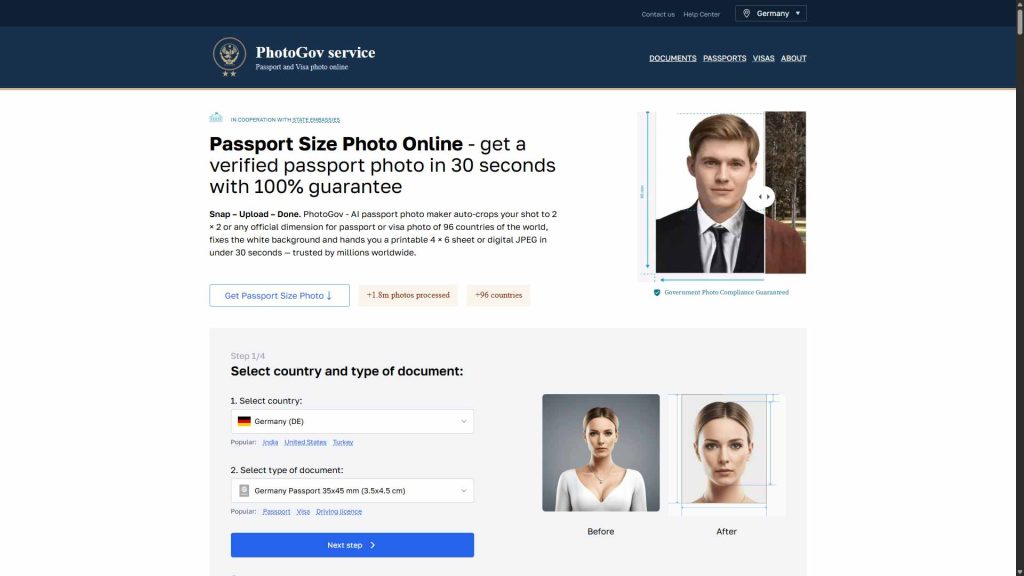
۱. PhotoGov.net؛ حرفهای و بینالمللی
اگر برای سفارت یا درخواست ویزا نیاز به عکس دارید و استرس دارید مبادا استانداردها رعایت نشود، PhotoGov.net همان جایی است که به آن نیاز دارید. این سایت به طور تخصصی روی عکسهای پاسپورت و ویزا برای کشورهای مختلف تمرکز دارد و استانداردهای هر کشور را دقیقاً میشناسد.
نکته جالب اینکه ظاهر سایت خیلی ساده و سرراست طراحی شده، طوری که حتی اگر با این جور ابزارها میانه چندانی ندارید، بدون دردسر میتوانید از آن استفاده کنید. فقط عکس را آپلود میکنید و بقیه کارها را هوش مصنوعی انجام میدهد.
ویژگیهای PhotoGov.net :
استانداردهای عکس پرسنلی بیش از ۱۰۰ کشور را پشتیبانی میکند (یعنی خیالتان از بابت تأیید شدن عکس راحت است)
خودش ابعاد استاندارد را تشخیص میدهد و عکس را برش میزند
پسزمینه را به رنگهای مجاز مثل سفید یا آبی روشن تغییر میدهد
ابزارهای ساده برای تنظیم نور و کنتراست دارد
میتوانید عکس نهایی را در فرمتهای مختلف دانلود کنید
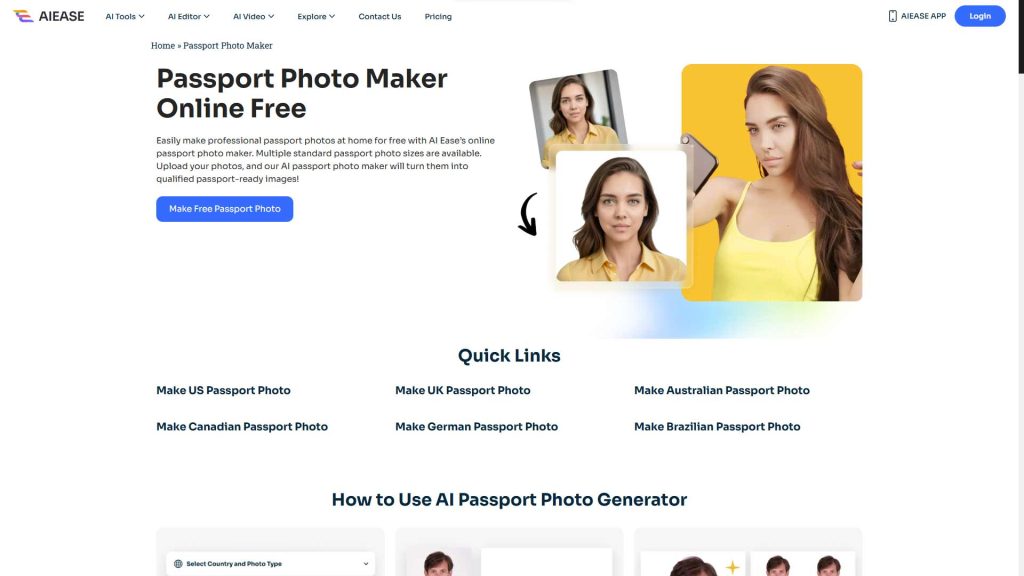
۲. AIEase.ai Passport Photo Maker؛ سریع و همهکاره
AIEase.ai یک سایت بزرگتر است که بخشی به نام Passport Photo Maker را به ساخت عکس پرسنلی اختصاص داده. اگر به دنبال گزینهای هستید که هم سریع باشد هم کیفیت خوبی تحویل دهد، این ابزار انتخاب مناسبی است. هوش مصنوعی به کار رفته در این سایت، فرآیند تبدیل عکس معمولی به عکس پرسنلی را حسابی ساده کرده و نتیجه نهایی معمولاً رضایتبخش است.
ویژگیهای جذاب AIEase.ai:
چهره را به طور خودکار تشخیص میدهد و عکس را صاف و تراز میکند
پسزمینه را هوشمندانه به سفید یا آبی تغییر میدهد
انواع ابعاد استاندارد برای پاسپورت، ویزا و کارت شناسایی را پشتیبانی میکند
ابزارهایی برای بهبود کیفیت و ویرایش عکس دارد
قبل از دانلود میتوانید پیشنمایش را ببینید و مطمئن شوید
جمع بندی:
این روش سریع، کمهزینه و دسترسیپذیر، میتواند در بسیاری از موقعیتهای فوری زندگی کاری و شخصی به دادتان برسد. اگر تجربهای از ساخت عکس پرسنلی با هوش مصنوعی دارید یا این پرامپت را امتحان کردید، خوشحال میشویم نتیجه را با ما و دیگران به اشتراک بگذارید. کدام بخش برایتان چالشبرانگیز بود؟